SilverBullet 3.0
I’m happy to introduce SilverBullet 3.0: the markdown-based knowledge management system that grows with you — now more user friendly, easier on the eyes, and with a slew of new features.
For years, I’ve struggled to figure out how keep SilverBullet a clean and minimalistic editor, while still somehow having users discover its many powerful features. So much software devolves into a mess of panels, pop-ups, on-boarding wizards or AI chatbots, and I didn’t want to become one of those.
Until 3.0, my best solution was “you’ll just have to sit through videos of me demo’ing all this stuff.” That worked, to some degree — YouTube tells me people have watched thousands of hours of my SilverBullet content. A fair number of you got hooked. But likely, even even vaster majority checked out early. Too much time to invest, too much monospace font.
SilverBullet 3.0 is another attempt at making SilverBullet accessible to a larger audience, without making it less powerful. It’s still the same engine and capability underneath, just with a smoother, more accessible experience. I hope.
This experience improvement comes from a few improvements:
- Visual facelift: SilverBullet now has proper support for themes, and while the old look is still available (install the Classic theme library), the default is now much friendlier, and uses Inter and Lora fonts, which many will find more pleasing to the eye.
- More discoverable markup and blocks: hover your mouse over a line in the editor, and a ⋮ handle will appear offering you context-dependent suggestions on how to manipulate that line, e.g. to turn it into a task, or a header, or to insert a query. Selecting text pops up a markup bubble with markup options. All these list keyboard shortcuts so you can just hit the key next time.
- A Workbench to visually (that is: not through code) change your configuration, create queries through a UI, evaluate Lua expressions, and many other things. Workbench is your new best friend when you’re in “Build mode.” You can do a lot of things here that previously required you to manually write Lua code.
- Form-based editing of frontmatter (and data blocks). No more need to edit your page’s meta data in YAML like an animal (unless you want to). There is now a (schema-aware) form-based editor.
- Starter kits: SilverBullet now ships with a few starter kits to not have to build a space from complete (or near) scratch. More and improved kits will be added over time.
User experience improvements are not all that’s included, though. 3.0 also brings some other new features:
- Full-text (semantic) search.
- Support for creating variables in Lua directives, turning your pages into “Lua notebooks” or a type of text-based spreadsheet.
- An MCP server, for the AI enthusiasts.
Because this is a major version bump, I used it as an opportunity to do some cleaning. This does result in some breaking changes for some users. If you adhered to some informally established conventions, this won’t affect you, but it may require a little bit of work to upgrade your space:
- SilverBullet’s classic “single-space” mode is gone: if you still used it, a wizard will guide you to migrate to a multi-space setup after you upgrade. This also makes using SilverBullet to publicly publish a space a bit harder, but there’s now a dedicated silverbullet publish server for this purpose.
space-luaandspace-stylecode blocks (not${...}expressions) are now only evaluated when placed in pages in theLibrary/folder in your space. This was already the convention and best practice, now it’s enforced.CONFIGhas been renamed toLibrary/Config(and will be moved automatically for you) to fit with (2).- As part of properly supporting Theming, some rules around CSS have changed, this may affect your current
space-style. Sorry about that, but to set this up for the future we had to rip off the band-aid at some point. More details on the Theming page.
As later 2.x versions, SilverBullet 3.0 comes in two editions:
- Desktop: the fully local experience. Just download the app and go. Sync with Server when you want to go multi-device or multi-user.
- Server: the (self hosted) server with browser-based access.
Let’s dive into some of the specifics. The rest you’ll discover on you own.
If you prefer a video overview of what’s new, here you go:
Themes and fonts
Two releases ago I doubled down on monospace fonts. I did this partially as a joke, partially out of spite, partially to communicate that I thought there was no practical path to support proportional fonts, like, ever. <insert technical reasons here>.
But ever is a very long time.
I was challenged on this topic again recently. Yet another person gave me the direct feedback that they thought SilverBullet seemed technically cool, but looked ugly. Primarily because of the mono font space thing. Alright then, let’s do another check in 2026. Would it be feasible to support proportional fonts (a.k.a. “regular people fonts”) without completely breaking things?
As it turns out — this was easier than anticipated. So here we have it: Font support. And better yet, you can distribute new fonts as libraries, check your Libraries tab (more on this in a bit) to install some and experiment!
This newfound freedom then escalated to the long-term wish to add proper theming support to SilverBullet. For this to happen I knew that I’d have to break some stuff, like people already hacking themes in using space-style blocks, which kept me from making a move. The idea I can finally do this as a breaking change for 3.0 made me do it. So there you have it: Theming support in SilverBullet. SilverBullet 3.0 ships with just two themes out of the box (or kind of one, just a light and dark version of it), but in you can find a few more via your Toolbench > Libraries (more on this later). Themes, obviously, are just libraries, so all the distribution mechanisms were already in place.
Starter kits
A blank page is a scary thing to some. Until now, a new space came with a single welcome page, targeted at private space use case. But times, they’re a changin’. In 3.0, creating a space starts with a gallery of starter kits:
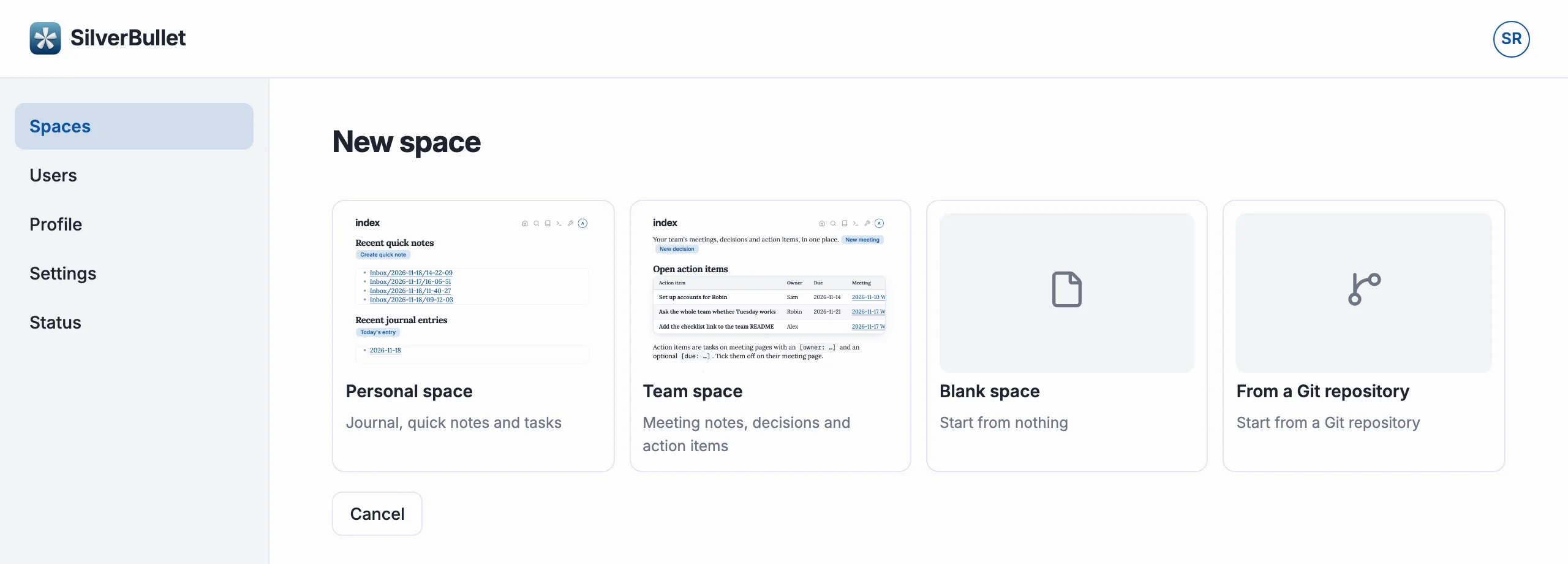
- Personal space: a home page with quick notes, a journal, tasks and recent pages.
- Team space: meeting notes, a decision log and action items, with buttons to create new meetings and decisions from templates.
- Blank space: a one-line home page and nothing else.
- From a Git repository: use any public Git repository as a starting point, or (on Server) create the space and keep it in sync with that repository.
A starter kit is copied once when the space is created, after that the files are yours to do with as you please.
Search
This is one of those features that SilverBullet simply didn’t have in any usable form. Or, in fact, it delegated to Silversearch, which is a great library (that will remain relevant) but can’t be integrated into core, because of license issues. As with any of the areas that SilverBullet is about to “hijack” in terms of functionality, I checked in with MrMugame who built Silversearch, before making a move here. After some exploration I ended up with a significantly different design, which makes Silversearch still useful for pure offline use.
So what’s there in 3.0?
As you (hopefully) know, SilverBullet is an essentially offline-capable web application. (Almost) all functionality keeps working when you’re disconnected from the server. For the Desktop app this is obviously a given, but it’s also mostly true for the Server’s PWA client. All your content (except documents) is synced locally, all indexing and querying and rendering happens locally, so all of it runs without even calling the server. This is great, but comes with trade-offs. One is performance, and another is storage.
Therefore, lately I’ve become a bit more pragmatic on this topic. For instance, the Revisions feature is based on server-side git. Unless you use the Desktop app, the revisions are only kept on the server. You cannot access them offline. This seems like a reasonable trade-off to avoid having to run full-on git in the browser, and keep the entire history of your space synced in every client.
For Search I decided to try the same thing by making it server only. While Silversearch proves that client-only search can work, it is rather heavy on indexing cost. Every client has to build the full-text search index over and over. If you’re ok with that, feel free to keep using it. If you don’t need that, you can give SilverBullet’s full text search a try.
SilverBullet’s full text search is based on a Rust library named tantivy. A search library very similar to Java’s Lucene that is very fast. SilverBullet will maintain a full-text index for your spaces automatically at hardly any cost, and offers full-text search capability to any connected client via Space: Search (Cmd-Shift-f/Ctrl-Shift-f) as-you-type.
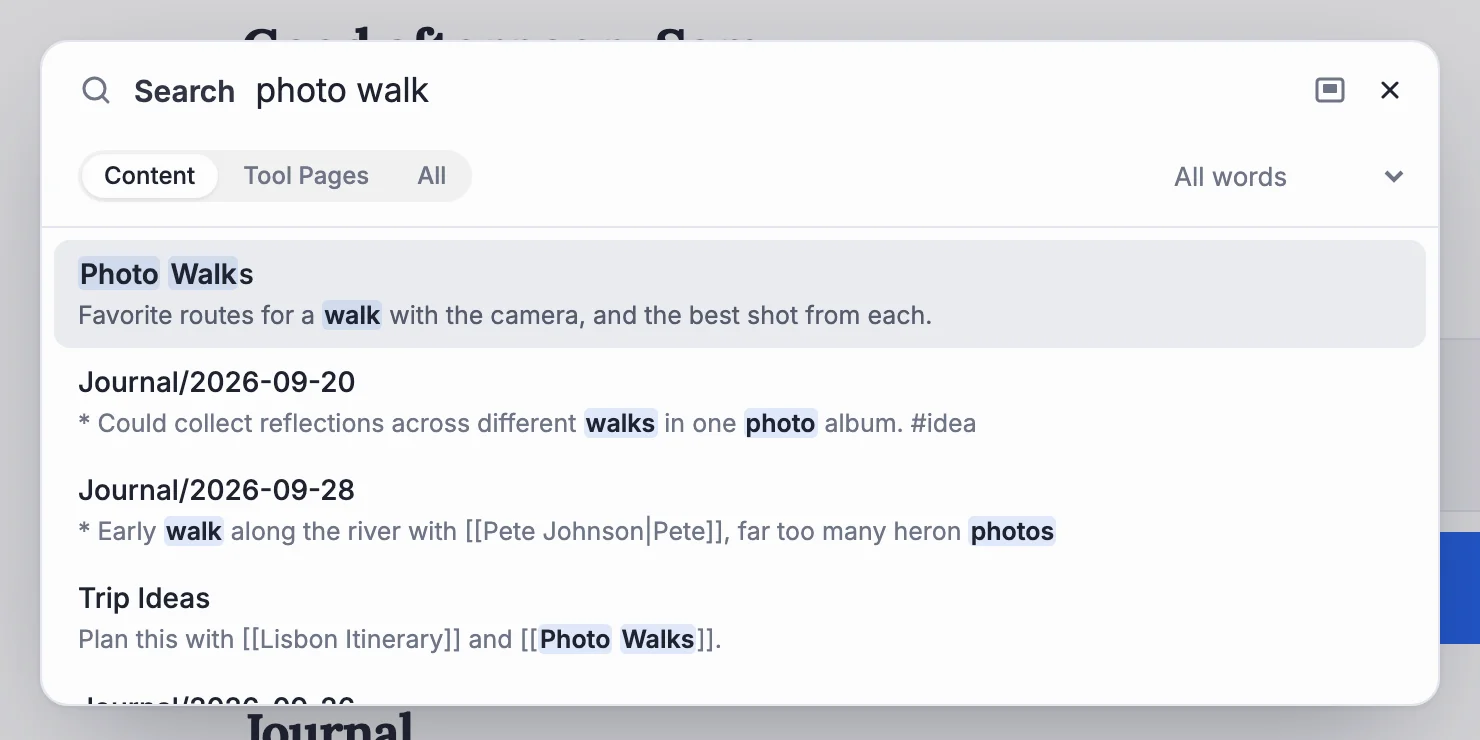
But I decided to push this a little further than just table stakes. Therefore, in 3.0 there’s a second search engine you can enable, which is semantic search. This engine is heavier-weight (which is why it’s disabled by default) that will “vectorize” your content using a (locally) running model (currently two multi-language models are supported) and run your queries against that. The idea is — rather than matching (effectively) just substrings in text — you will now get better results because words that are semantically (in meaning) related, will also match. So, if you search for “bike” but your page text says “bicycle” there’s a good chance you will find it anyway. In addition, this enables a “Related Pages” widget (that will be enabled if you set up semantic search) that attempts to find semantically related pages. From my own experience, this quite often pops up with pages elsewhere in my space that are (indeed) related but I had totally forgotten about. An interesting new discovery mechanism!
Again — you have to opt in to semantic search explicitly — it lives in the Dashboard under Settings > Search, you have to pick a model to download and wait for indexing to complete. On large spaces this may take a long time, but you can track progress. This feature works 100% locally (= on your server, or for Desktop: on your computer). None of your content ever leaves to any external service.
And of course there are APIs for all of this.
Form-based frontmatter (and data block) editing
While I’m sure everybody just loves editing YAML by hand, I’ve empirically established that in fact very few people enjoy editing YAML by hand.
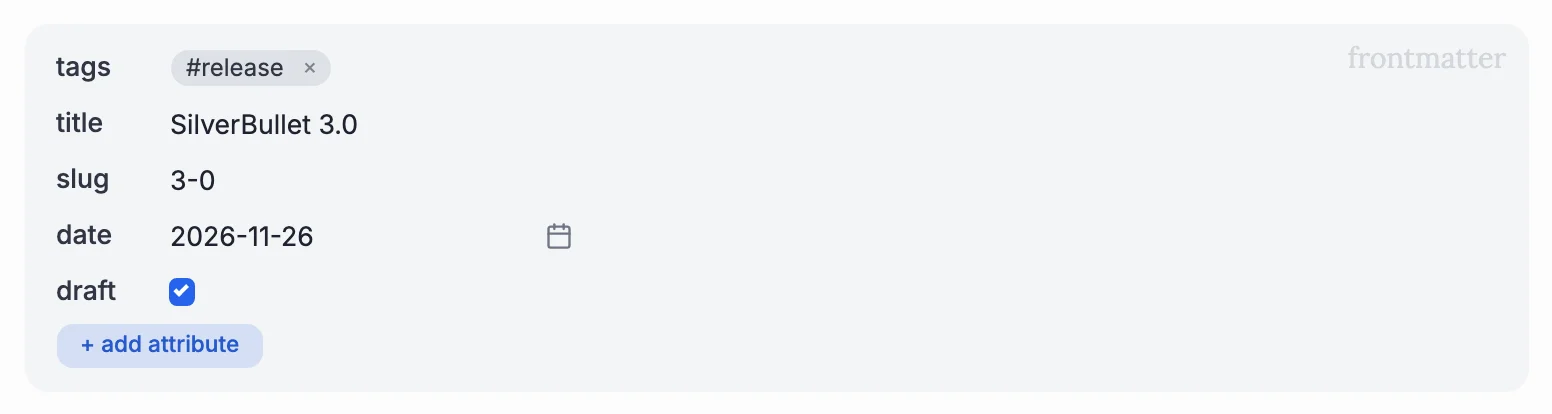
Therefore, SilverBullet now has a form-based editing for frontmatter (and data blocks), if you’re into that kind of thing. It’s implemented in Space Lua, and uses custom frontmatter rendering that was added in 2.12. You can disable it in the config, or Alt-click the frontmatter block to edit YAML by hand, like an animal.
This is what it looks like for the very post I’m editing right now:
Lua notebook
I would develop a spreadsheet application just so I would be able to call it “Piece of Sheet.”
— very mature me, at some point in time.
Obviously, building an entire application just in an attempt to make a pun would be a bit silly. So this idea remained parked for a long time for opportunity to arise.
A little while ago, I had a few basic calculations to do, and what was in front of me was (of course) SilverBullet.
SilverBullet enables inline calculations: ${20 * 1.1} that live preview into their result. That’s nice, but not very composable. How do I now base the next calculation on the value from the previous one?
Sure, you could write Space Lua and define global variables, or somehow find hacky ways to effectively save intermediate results of your calculations, but that’s not very nice. And yes, there are libraries that embed entire spreadsheets into SilverBullet, but meh, that’s a bit too much for what I’m looking for.
So I wondered — what would it take to better support the “I need to do some back-of-the-envelope math” that would naturally fit in with your quick note taking and journaling habits?
More importantly — what feature would I need to build to finally make the “piece of sheet” pun in a release post?
🤔
As I figured out — not all that much. In fact, only two things would need to be added to how SilverBullet works today:
- It would need a way to bind a (Lua) expression to a local variable
- It would benefit from some way of keeping intermediate values just for that page, as to not pollute the entire space (or the page itself) with one-off math or other calculations.
Bonus: it would be really nice to have widgets/expressions update in quasi-real-time, not to have to constantly run an “update all the things” command.
So I did all that. For the memes. Enter page variables.
You can now write this: ${variableName = expression} to create a page-level variable name that you can reference from other ${...} expressions on that page. And if you don’t want an intermediate value to show up on the page, ${local variableName = expression} defines it without rendering anything.
That’s it. Ok, and perhaps the ability to programmatically update some of these ${someValue = ...} page variables.
So, now you can write this:
My salary right now: ${salary = 1000} USD.
I'm getting a raise of ${increase = 5}%, so my new salary shall be ${salary * (1 + increase / 100)} USD.
and it will render like this:

Update the salary cell, and the other values automatically update with it.
Like a piece of sheet.
Ah yes. Very satisfying. Totally worth it!
I mentioned back-of-the-envelope math as the use case, but that’s just one. This is not math specific, anything goes. Your variables can contain queries, other values. You can effectively do a lot of “Python notebook” stuff in SilverBullet right now.
This is one of those features where I’m eager to see how (and if) people end up using it, because I see many potential use cases. If there’s one thing I have enjoyed most of this whole SilverBullet journey is what you — “the people” do with it. I’m always amazed by the creativity. So let’s see!
That gets the headline feature out of the way. Now let’s move on to other, unrelated things.
Workbench
Now that we got that all out of the way, let’s talk about getting leverage out of four plus years of investment in the fundamentals. I’m very excited about this one.
Enter Workbench. Think of this as “Chrome DevTools — but for SilverBullet.” It exposes a lot of the infrastructure and fundamentals that SilverBullet has had for a long time in a new, and more accessible way that you can use when you’re in “build mode” — that is, you’re not editing content, but trying to automate some things, query, experiment, incrementally formalize.
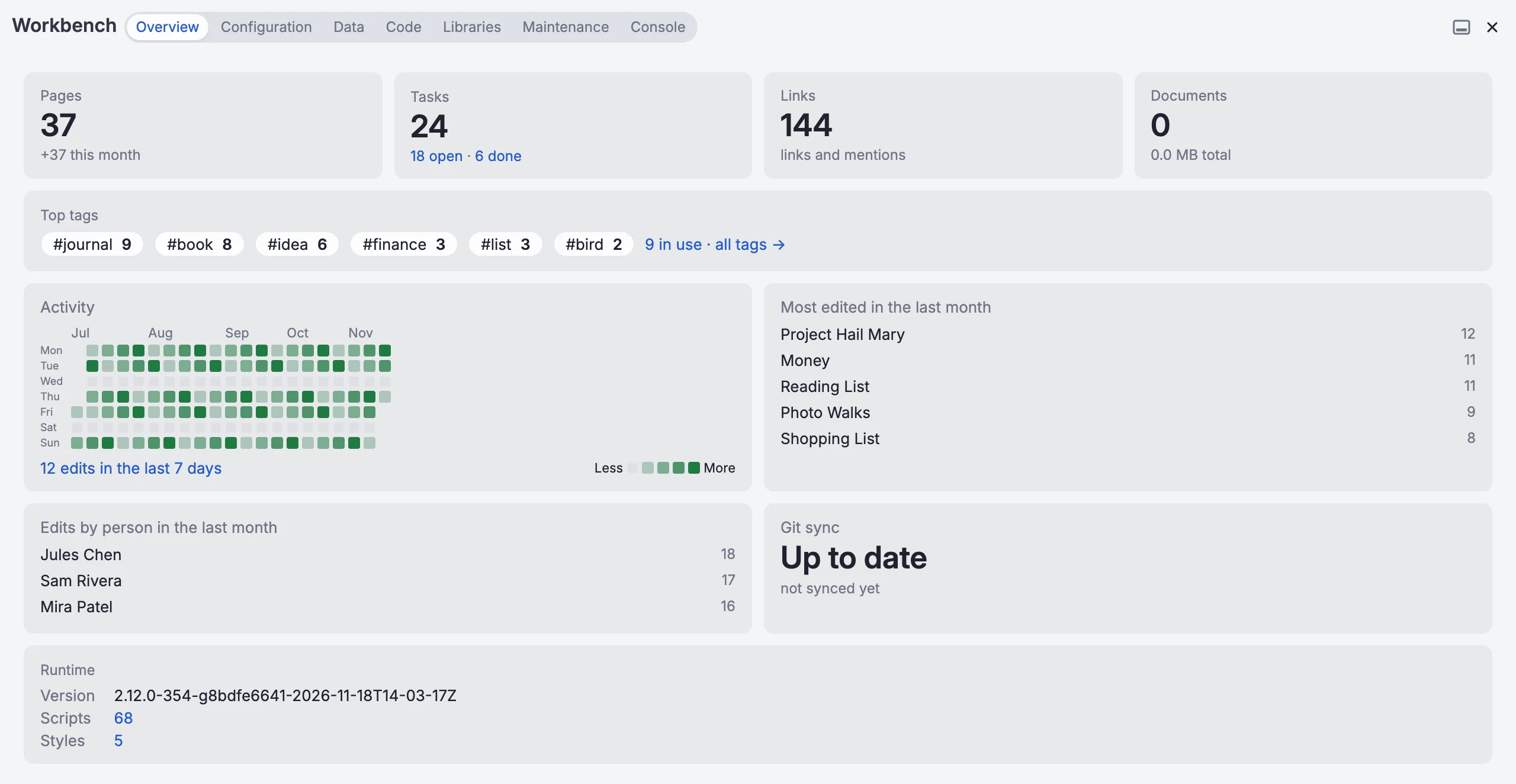
Let me show you some pictures to give a sense what’s in the Workbench in 3.0. You open the Workbench via the various Workbench: * commands, or hit that new gear icon in your action bar.
By the way — these examples use a copy of the personal space demo.
To start: the Overview — this gives quick stats on your space (number of pages, tasks, links, documents), popular tags, a GitHub-like activity graph (if you have revisions enabled), what pages were most edited (again, if you have revisions enabled), what account was most active in the last month, git status, application stats. You know, random fun stuff.
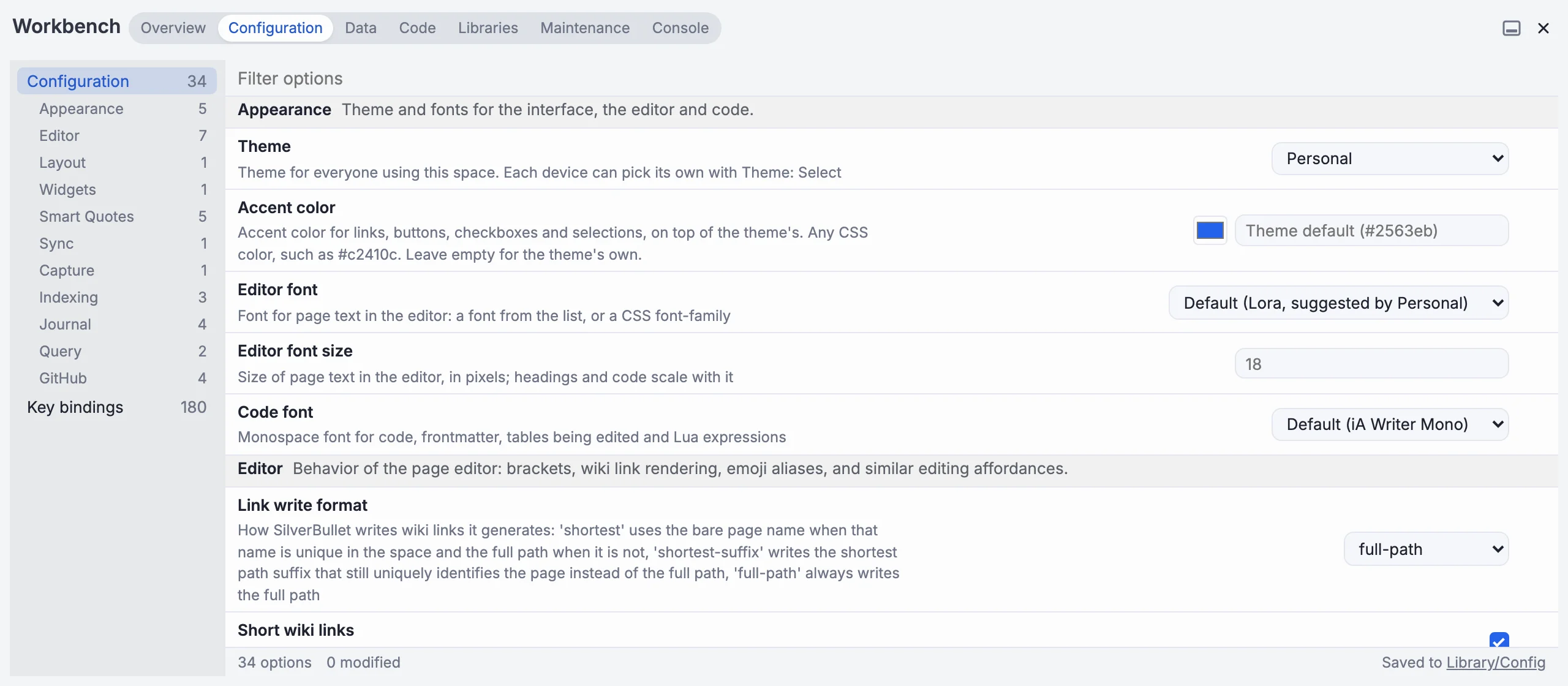
Next up: Configuration. This is effectively the old Configuration UI ported to the Workbench environment. You can browse settings by category, filter them by name, and configure key bindings here too.
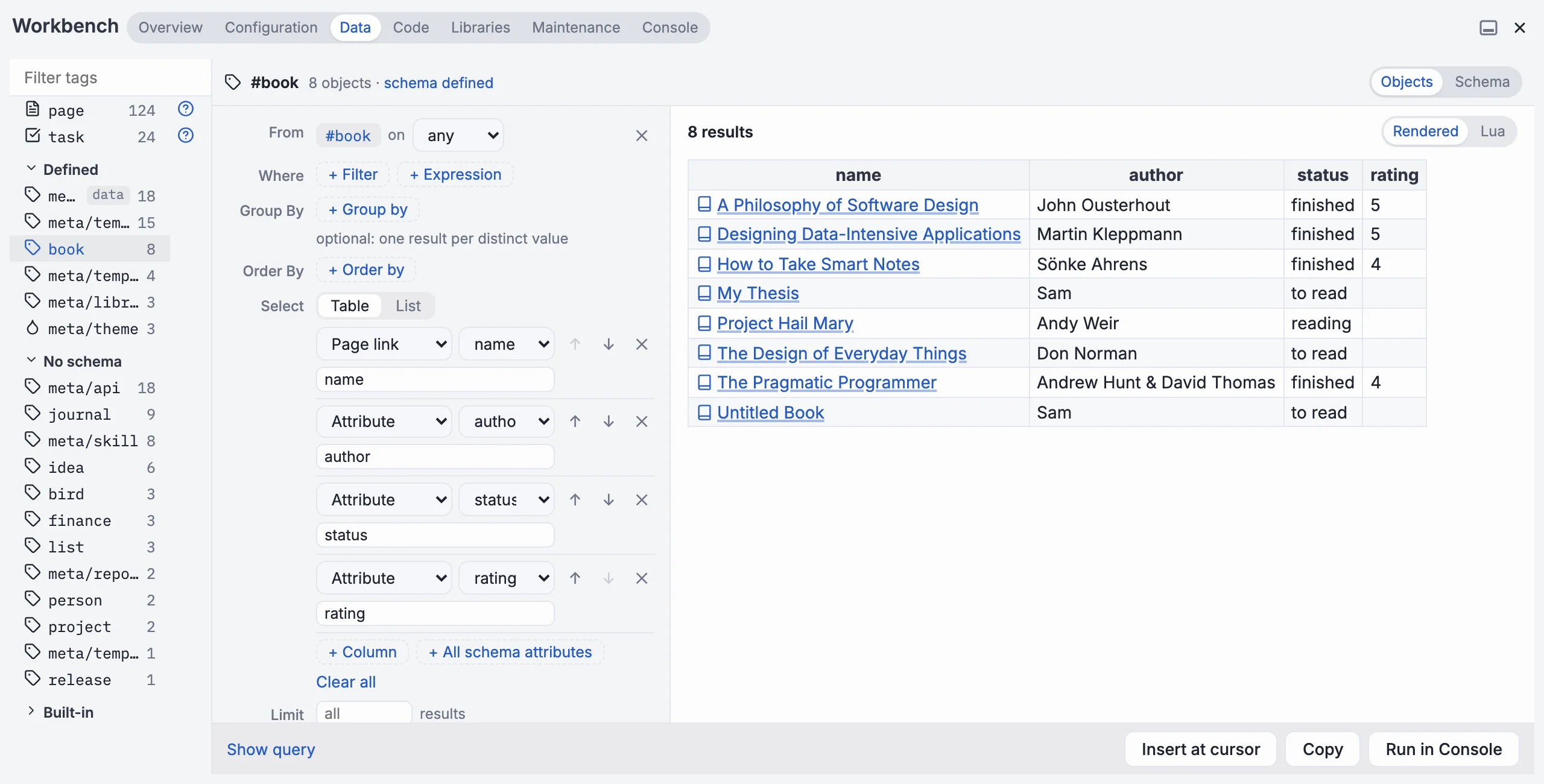
Then, the Data tab’s Objects view: this gives you a quick and (hopefully) user friendly way to explore your space’s objects: pages, tasks, or whatever custom tags you introduced: books, birds, whatever. Then, it allows you to build queries on top of those through point-and-click and observe the results. This all results in a query which you can copy and paste into any page to render these same results. In many cases you can also use this query editor to edit existing (simple) queries, there’s a context menu for those in-page now as well.
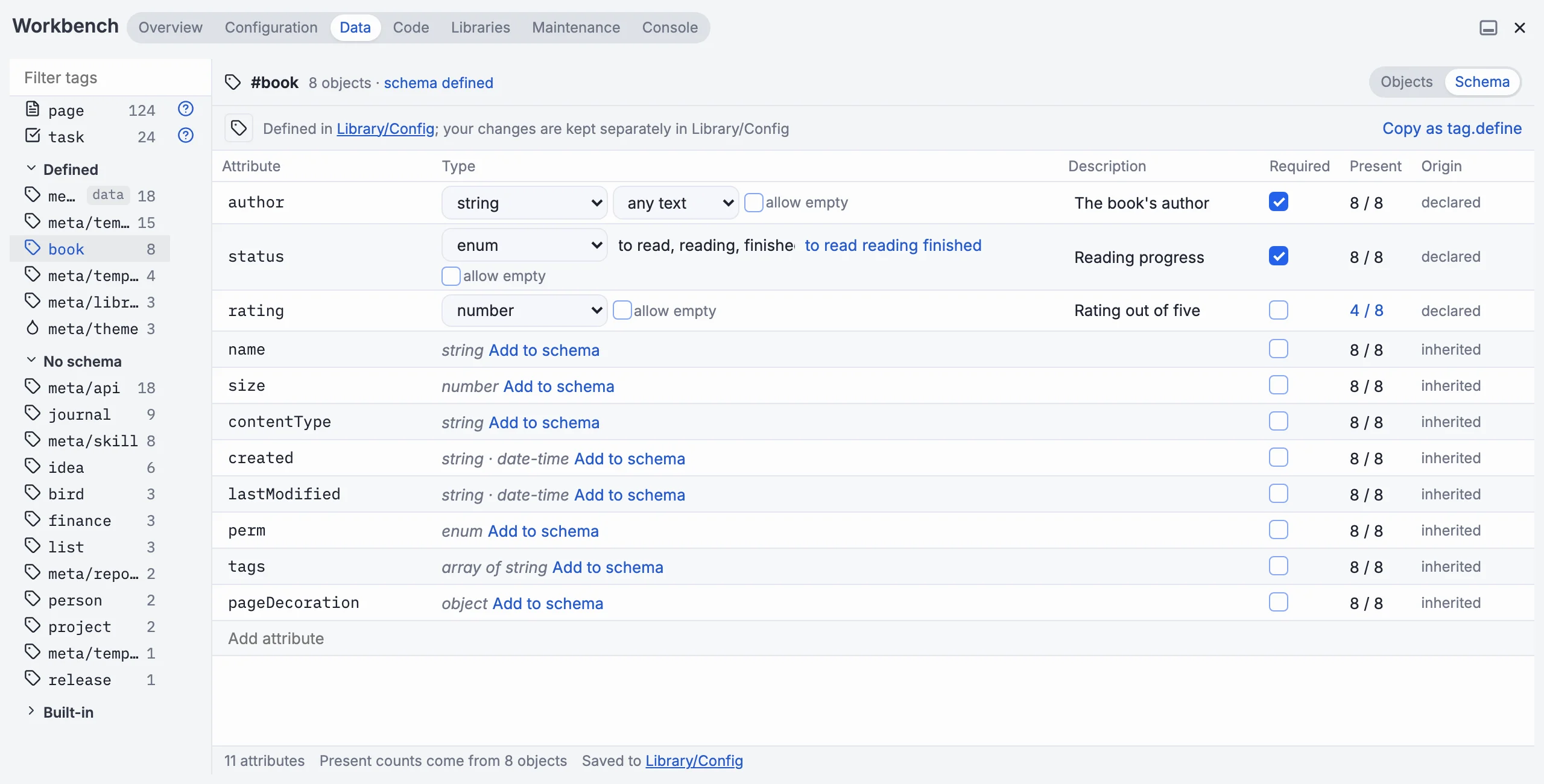
The same Data tab also has a Schema view. Say you have a bunch of pages tagged #book: what attributes do they have? Which ones are strings, numbers, or a fixed set of values? This view lets you inspect what’s already there and build a formalized schema for them, which you can later check against (in the “Maintenance” tab).
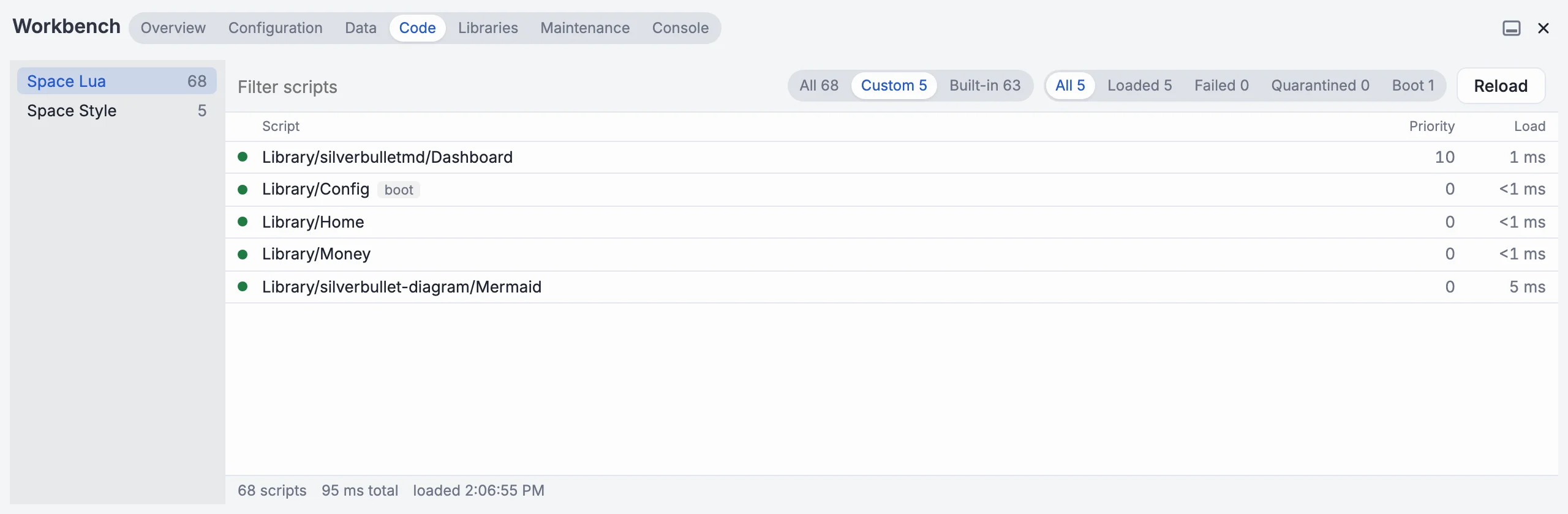
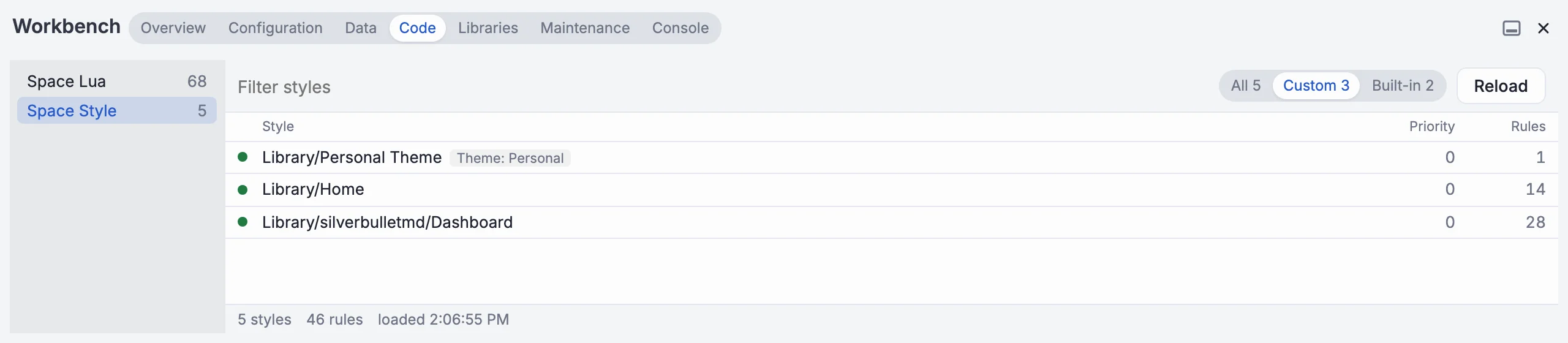
Next: the Code tab’s Space Lua and Space Style sections show all the space-lua and space-style that is active in your space, and the order in which it is loaded, what’s broken and how long it all takes to run:
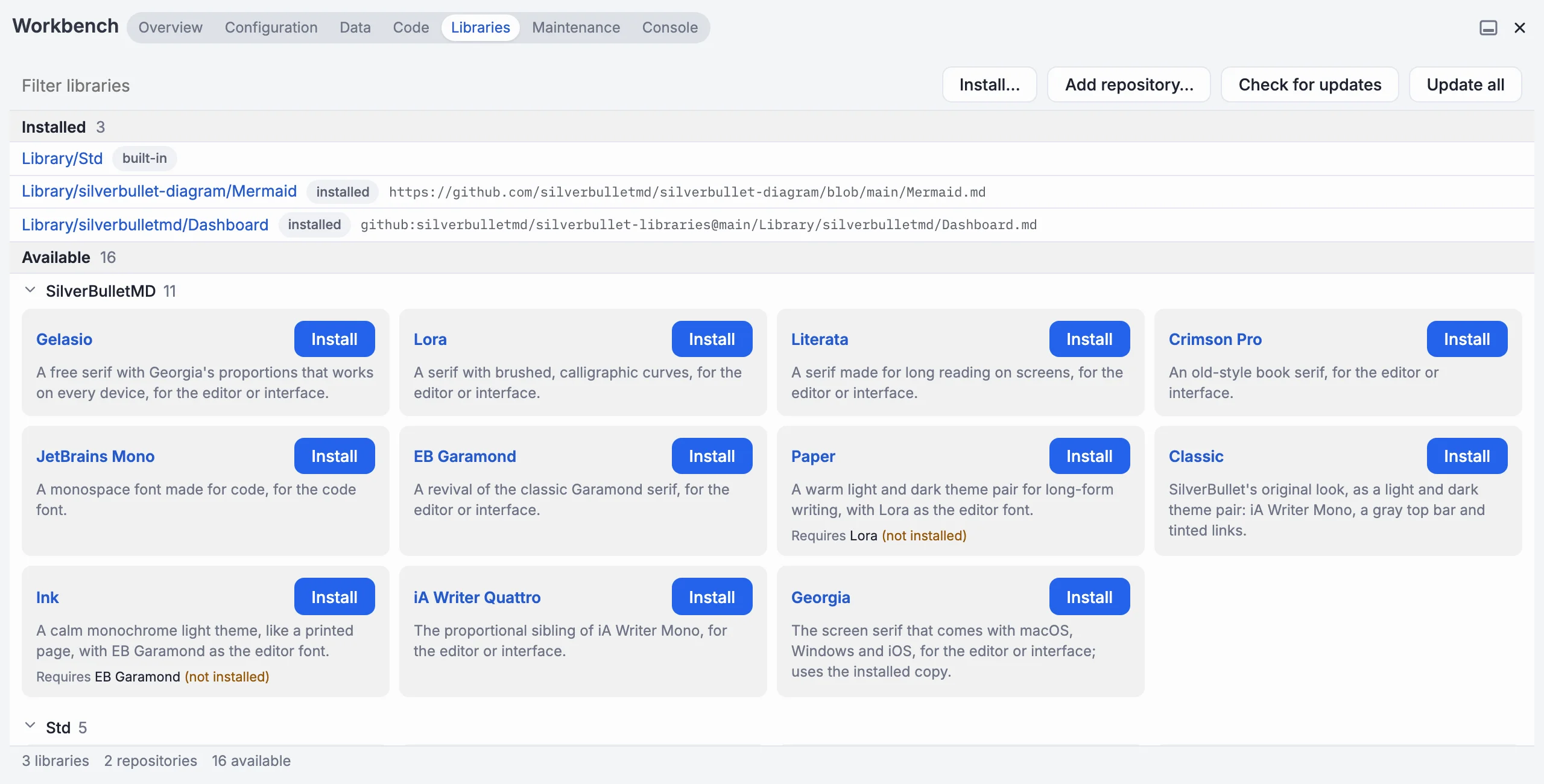
Next: Libraries. Previously this lived in the Configuration Manager, but it’s now been moved to the Workbench as well. Same as before: a way to install and update libraries, just restyled to fit the Workbench.
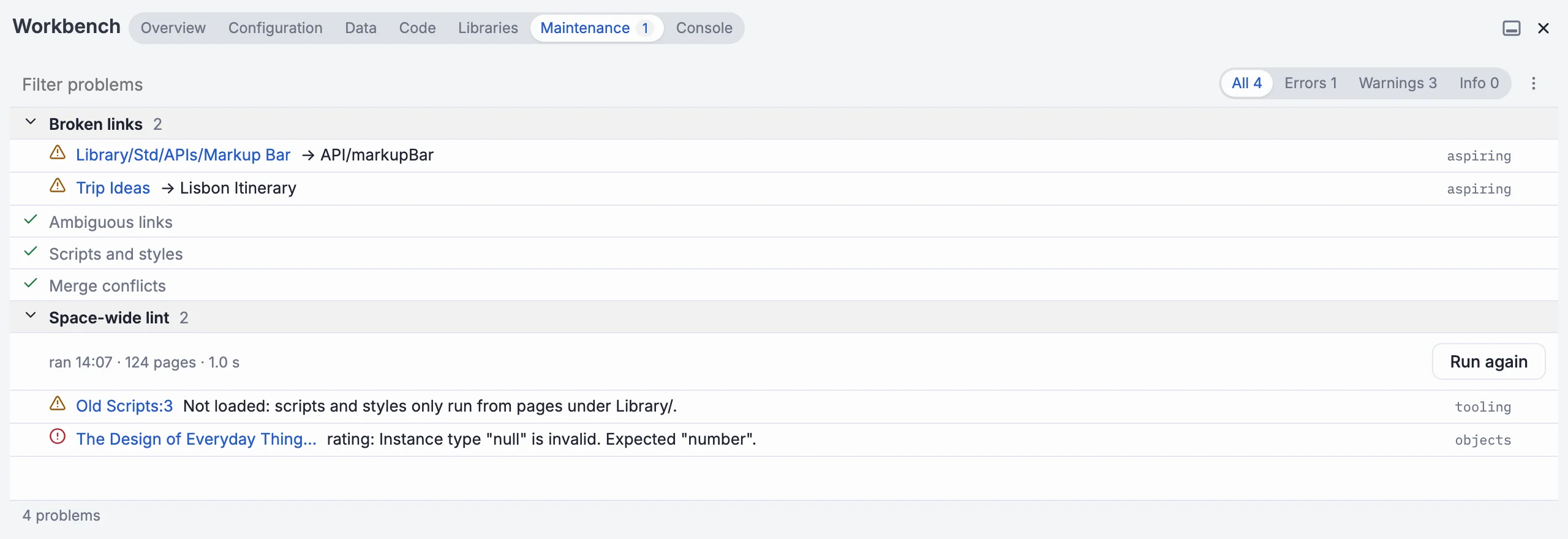
Then, the Maintenance tab replaces the old Maintenance meta page. It shows broken and ambiguous links, failed scripts, merge conflicts, and results from the on-demand space-wide lint.
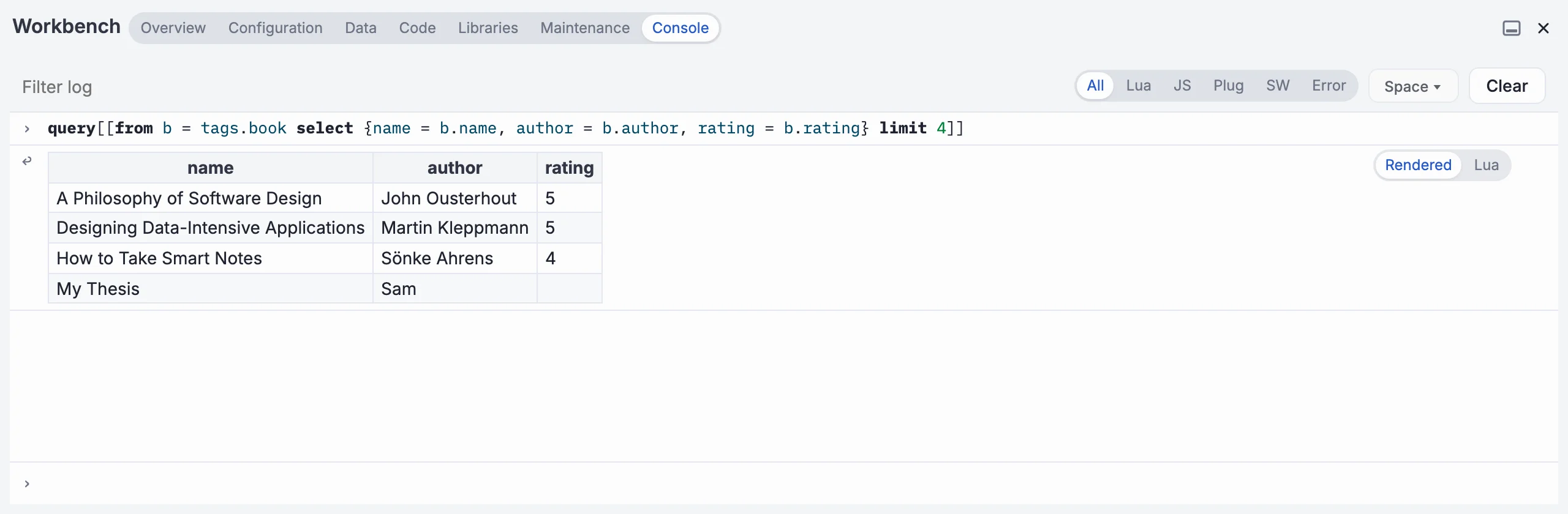
Finally, the Console: it happened too often that I’d have to ask people to open their browser’s JavaScript console to see what’s going on. That should now be required less often, because we have the Workbench Console now. This, in addition to showing you Lua, JavaScript, plug and service worker log messages, also allows you to evaluate arbitrary Lua expressions. Whereas Chrome’s DevTools rely on you entering JavaScript, here you can enter Lua, and it renders Lua expressions (more or less) the same as if you’d put them on a page.
There’s more to be said about many of these features individually, but maybe I’ll leave that to subsequent posts with a bit more of a deep-dive on each.
More Customizable Space Tree
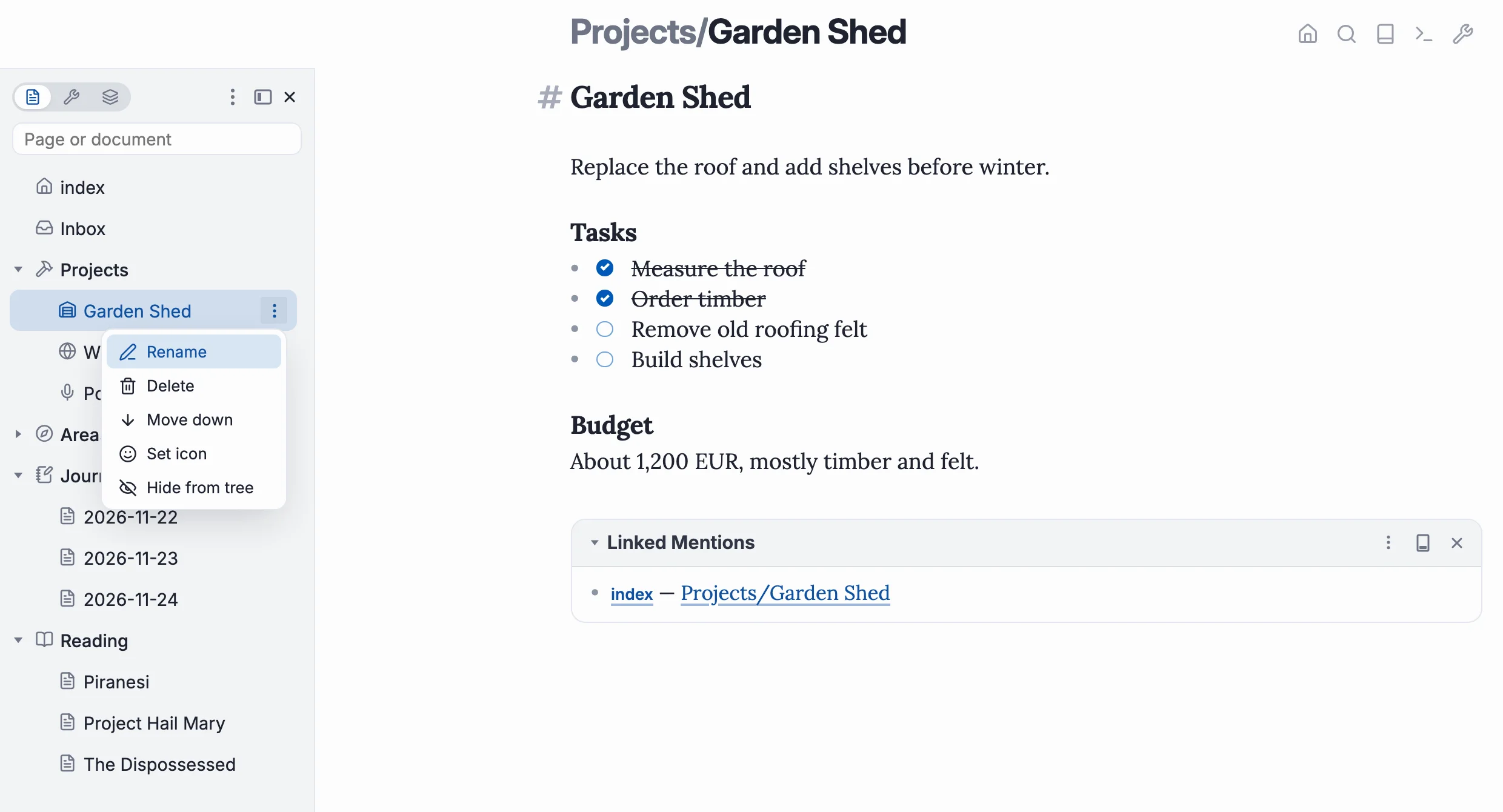
A previous release already introduced the Space Tree (file tree), 3.0’s version is much more customizable. You can now create folder explicitly, reorder items in the tree through drag and drop (or the context menu), assign custom icons to items, hide items etc.
Now for the some of the less fun stuff (depending on your definition of fun).
Breaking: Scripts and styles can now ONLY live in Library/
Until now, space-lua and space-style blocks could live on any page in your space. Flexible, sure, but it also meant your customizations ended up scattered around — were sometimes accidentally applied, and SilverBullet could only find them by indexing your entire space first. Chaos! On a fresh client (a new browser, a new device, or after a reset) that meant waiting for the full initial index before your scripts, styles and widgets kicked in. On a large space, that can take a while (sometimes minutes).
In 3.0 scripts and styles now only run from pages under Library/. These pages are now called Library Pages (RIP “Meta Pages”), and the Workbench, pickers and search all distinguish them from your “Content”. Your configuration moves there too: CONFIG is now Library/Config (an upgrade will move this automatically).
The payoff is that SilverBullet knows exactly where to look, so it loads all your scripts and styles in one go at boot, without waiting for the index. On my own space (about 2,100 pages), a fresh client now renders widgets after about 0.6 seconds, down from about 17s. Styles also apply right away, so no more flash of unstyled pages.
This is a breaking change though, so check the upgrade notes below.
Upgrade notes
If you’ve upgraded to 2.11 or 2.12 before, the basic act of upgrading your Server should be nothing but the usual docker update or silverbullet upgrade call. Desktop self-updates, or if you’re a flatpak user, upgrades via flatpak update.
If you were still on the classic “single space” mode, you will be greeted with a migration wizard on the web during the first boot. The steps should be quick and non-destructive, but backup your files in advance anyway.
As just mentioned (you’ve been paying attention until the end right?), the breaking change most of you are likely to run into: space-lua and space-style blocks now only run from pages under Library/. When used outside they get a lint warning, so they’re easy to spot. If you kept scripts or styles elsewhere, move those pages under Library/ (for instance Library/My Scripts). Tagging a page #meta no longer makes a difference.
To detect if you are affected: run the Workbench: Maintenance command to open the Workbench’s new Maintenance tab, then hit Run space-wide lint. This will turn up any uses of space-lua and space-style outside your Library/ folder. Then, simply rename those pages to start with Library/, reload and you should be good.
Your CONFIG page moves too: on its first start, the server renames CONFIG.md to Library/Config.md and logs that it did.
Support indie development!
Last year I made the decision to reduce my regular day job to fewer days in order to spend more time to work on SilverBullet. This allows for deeper focus and more ambitious work. And voila, here you have it — 3.0!
If you like this direction, and would like to support it, there are multiple ways to make this more financially sustainable for me:
- Buying SilverBullet Desktop Pro (some buy it, even thought they don’t use it — just sayin’)
- Donating to the open source project
A big ❤️ to all already supporting this way — it’s much appreciated! And as you can tell from the progress, we’re moving full steam ahead with the additional time that I can now spend!
Full(ish) changelog
- Theming: themes are here along with a significant visual refresh. Themes can can be distributed as libraries. SilverBullet comes with SilverBullet Light and SilverBullet Dark. Pick a theme for the whole space in Workbench/Configuration (Appearance → Theme), or for one device with
Theme: Select.- A theme is a
Library/page taggedmeta/theme: a few base colors give a complete theme, and it can suggest fonts. See Theming/Creating a Theme. - New API/theme API to list themes and pick one for this device.
- Breaking for theme authors, see Theming/Upgrading Existing Styles.
- A theme is a
- Markup bar: the keyboard bar’s concepts are now also available on desktop, in two places:
- A formatting bubble over selected text.
- A ⋮ handle beside the line under the mouse.
- Each surface has its own button list:
markupBar.mobile(the phone bar),markupBar.selection(the bubble) andmarkupBar.line(the ⋮ menu, whose buttons also takegroupandactiveContexts). - Turn either off for the space with
markupBar.selectionBubbleandmarkupBar.lineHandle(also in Workbench/Configuration), or per device withEditor: Toggle Markup Bar. Phones keep their bar above the keyboard as before.
- Workbench: Think DevTools for SilverBullet:
- Workbench/Overview: “Fun facts” about your space (replacing the old Space Overview page that nobody found)
- Workbench/Configuration: the Configuration Manager moved into the Workbench. Changes here and in Data’s schemas save as you make them, no more Save button. Under Layout, Use current layout (or
Navigate: Save Layout as Default) saves the side panels you have open, such as the Space Tree, as what people opening the space for the first time see. - Workbench/Data: for each tag, Objects builds queries visually (exportable as Space Lua/Integrated Query to paste in your page) and Schema shows and edits its attributes, saved to Library/Config.
- Workbench/Console: Lua console to evaluate expressions, test things out, debug. Switch between space and page context to work with page variables. Also logs a lot of useful stuff.
- Workbench/Code: all the Space Lua and Space Style that’s loaded, in what order.
- Workbench/Libraries: the Libraries manager, moved from the Configuration Manager, with update checks for installed libraries and repositories.
- Workbench/Maintenance: find broken links, conflicts, and other problems in your space.
- Page variables: turns a page into a small spreadsheet. Define values inline with
${name = expression}, use them in any${...}on the page, and read or set them from other pages with API/pageVars. - Breaking: Space Lua and Space Style blocks now only run from
Library/. Aspace-luaorspace-styleblock on any other page is shown but no longer runs, and gets a lint warning. See ADR/012 Tooling Lives in Library for the reasons. As part of this:- The
CONFIGpage moves toLibrary/Config. The server renames an existingCONFIG.mdtoLibrary/Config.mdthe first time it starts. Everyspace-luablock onLibrary/Configstill runs at boot. - “Meta pages” are gone as a separate concept: a page under
Library/is a Library page, defined by location only.index.metaPagesis nowindex.libraryPages, and themetasearch scope and picker mode are nowlibrary; the old names keep working. - Styles now load in the same order as scripts: by priority, highest first, with no priority counting as
0(unprioritized styles used to load before all others), then by page name and position on the page. - The bundled repositories moved to
Library/Repository/Std. - Repository maintainers: move your repository paths to
Library/Repository/*as well - Library maintainers: make sure your libraries live under
Library/*
- The
- Breaking (with migration wizard): single-space mode is removed. SilverBullet Server now always runs with spaces and accounts managed in the Dashboard. For those still running in single-space mode, you will now launch into a migration wizard that will update your setup.
- Full text & semantic Search is here:
Space: Search(Cmd-Shift-f/Ctrl-Shift-f) searches every page through a full-text index and optionally a semantic search index (needs to be enabled explicitly, see Semantic search). - Slash menu: now has grouping support.
- Space Tree: drag rows onto the top or bottom edge of another row to reorder them. The order is saved in Library/Space Tree Outline, and Move up, Move down and Reset order are in each row’s menu. Add
[icon: …]or[hide: true]after an entry there to give a page or folder its own icon, or to hide it and everything under it from the tree; Set icon and Hide from tree in the row menu do this for you.- The tree’s segments are now Content (default), Library and All, the same as Search. Hidden pages show, dimmed, only under All. In the Page Picker, Library Pages is now Library and also lists documents under
Library/, and hidden pages show only under All. - Breaking:
pageDecoration.tree.priorityis removed; arrange the tree by dragging instead. - Fix: moving or renaming a folder no longer loses links between the pages inside it. A folder move now asks once for confirmation, shows a single progress indicator and one summary instead of a notification per page, and lists any file it could not move.
- The tree’s segments are now Content (default), Library and All, the same as Search. Hidden pages show, dimmed, only under All. In the Page Picker, Library Pages is now Library and also lists documents under
- Related Pages and Linked Mentions show compact, formatted excerpts with clickable links. Space Lua widgets can use the same renderer through
widget.markdownSummary(see API/widget). - Live Object Edit: form-based editing for Frontmatter and Tag/data objects.
- Libraries can now require other libraries with
requires:in their frontmatter (full URIs, or paths relative to the library’s own URI). Installing a library installs what it requires, updating it installs requirements it gained, and a library another one requires can’t be removed until that one is. See Library#Libraries that require other libraries. ${...}expressions and widgets now compose everywhere and live update: buttons and other widgets work inside table cells, inside Markdown returned by other widgets, in transcluded pages, and in query results and templates. There were a lot of weird restrictions here before, hopefully these have now been resolved.- Share refresh:
- Sharing no longer changes the source page or stores
share.hashin its frontmatter. - Support for publishing to other SilverBullet spaces (see Library/Std/Infrastructure/SilverBullet Share)
- Sign in to GitHub with a device code instead of configuring a personal access token. Credentials stay on the current device and are never synced.
Credentials: ListandCredentials: Clearlet you inspect and remove them. Sharing individual pages with another SilverBullet space now supports push, pull and sync with device-code sign-in. See API/auth and API/github.
- Sharing no longer changes the source page or stores
- CLI unification. There is now a single
sbCLI (installation instructions in CLI#Installation) that can be used both remotely with Server, and locally with Desktop.- New
sb helplists your spaces, the space’s skills and an outline of it, andsb help <topic>prints a skill. The seven built-in skills are embedded insb, and a reachable space’s own copy wins. See CLI. sb luaruns a Lua expression or script (sb evalandsb scriptstill work as aliases). Likesb queryand the newsb screenshot --page <name>, it first lets the index catch up with recent file changes and prints a note on stderr when it could not, and console output goes to stderr so stdout holds only the result.sb fs readcan take several paths,--outline,--offset/--limitand--rendered(the page with queries evaluated, plus its lint problems).sb fs write,sb fs editandsb fs rmtake--revision(--if-matchstill works). Writing or editing a page with Space Lua or Space Style now reloads its scripts and reports its load errors and lint problems, and exits with code 9 (“written, but its scripts have problems”) when there are any;--no-reloadskips it. After changing files outsidesbyou still needsb lua 'system.reboot()'.--spaceaccepts a space’s name in any case or its id.sb fsandsb helpstart a stopped folder space of Desktop in the background and wait for it, up to--timeout.
- New
- Native menus in Desktop now expose Workbench tabs, Search and Graph View, with history and advanced maintenance grouped under Tools. Settings opens Workbench Configuration.
- Fix: On phones and tablets, tapping Search, Open page or Run command brings up the keyboard right away. Your own commands that open a picker can do the same with
opensInput(see API/command). - New
system.getPublicURI()returns the address others can reach the space at, whichNavigate: Copy link to current positionnow uses. In Desktop, a space synced with a server links to that server rather than the local127.0.0.1address. A space that doesn’t sync has no shareable link, sogetPublicURI()returnsniland the command copies a ref instead (see API/system). - New API/object API to change, delete and create objects where they are written, for building small apps on your pages:
object.update(frontmatter, task state and text, tags, inline attributes, data block keys, table cells),object.delete,object.append(tasks, items, table rows, data block documents) andobject.createPage. - More consistent Tag terminology: every object has exactly one root tag (
page,task,data, …), plus any number of user tags. Every built-in tag now has its own page underTag/(formerlyObject/), grouped into root, system, edge and index tags.- New
index.data(tag?)returns the objects of every data block. tag.definetakes aniconand apageDecorationthat apply to every page with the tag, such astag.define { name = "person", icon = "user" }, replacing thetransformboilerplate. Changing it re-indexes just the pages with that tag. See Page Decorations#Apply to every page with a tag.- Hashtags in headers and table rows are now recorded as tags, and every tag records the root tag it is used on as its
parent(hashtags in paragraphs used to saypage). Headers and table rows now getitagslike other objects. - Tag/data block keys can no longer overwrite
ref,tagoritags, and relations from data blocks now point at the object they’re written in. A data block named after a built-in tag (```#task) is no longer indexed. Lint flags it.
- New
- The Graph View is now a view with Local and Global tabs (
Graph: Explore,Graph: Global Page Map) that can dock in a sidebar or the bottom panel, where the local graph follows the page you open. - New context menus for widgets and views.
- Row actions in views (lists, trees, tables, and your own API/widget views) are now one ⋯ menu per row, which the menu key or Shift-F10 on the selected row also opens.
- Icons: every icon in SilverBullet is now a Lucide icon name, around 2,100 of them (up from 287 Feather icons), and the same names work everywhere: page decorations, tags, action and markup buttons, slash commands, views, and the new command
iconfield shown in the command palette.- Pick one with
Page: Set Icon(sets the page’spageDecoration.icon), from the Workbench/Data schema view for tags, or from Space Lua witheditor.pickIcon. Typingicon:in frontmatter completes icon names. - A tag has a single
iconfield: it labels the tag and is the default icon of the pages carrying it. - New
icon.svg,icon.resolveandicon.names(API/icon);icon.featherandicon.resolveFeatherare deprecated. - Breaking: inline
<svg>icons and Feather’s brand icons (github,twitter, …) are no longer supported.md-*editor icons andfeather:-prefixed names keep working for this release, with a warning in the console; see Icons#Renamed and removed icons.
- Pick one with
- Baked Sections styling: now show a slim header and an end line in place of their markers and offer a drop-down menu.
- Lua:
- Performance:
pairs()no longer copies the whole table on each iteration, reducing pauses in views that loop over many pages. - Performance: queries with a
from x = ...binding now evaluate the parts ofwherethat don’t depend onx(such as expensive function calls) once per query instead of once per row (function calls inwhereare assumed to have no side effects, since they may now run once per query). - Eligible queries with a
limitstop reading once enough rows are collected, and Workbench query previews avoid loading unnecessary rows. - A
${query[[...]]}(or any expression) that returns an empty result now shows a subtle, inline No results instead of an empty box. For a custom message,${some(query[[...]]) or "_Nothing here yet_"}still works. - New APIs:
net.listURIandnet.deleteURIlist and delete files at a URI through the provider that serves it (see API/net),crypto.sha1computes SHA-1 digests (see API/crypto),editor.pickManyshows a checklist to tick items from (see API/editor), andconfig.persistwrites one configuration value to the managed block of Library/Config (see API/config). index.metaPagesnow accepts an optionaltagargument to filter meta pages by an additional tag, likeindex.contentPages. See API/index.net.proxyFetchnow setsokfrom the remote server’s status (2xx), as itsstatusalready was. It used to be true for any response the proxy relayed. Reading anhttps:,github:,ghr:or GitHub URI now fails with the status for anything but a missing page (which still reads asnil), instead of returning an error page as content. GitHub downloads and update checks are anonymous again, so stale credentials cannot make public libraries appear missing. Publishing still authenticates. See API/net.- New
index.awaitPendingChanges()picks up files changed outside the client, such as through the HTTP API, and waits until they are indexed. See API/index. - New
markdown.link(target, alias?)makes a wiki link to a page or any object (by itsref), and nothing when there’s nothing to link to. The query builder, docs and standard library use it instead of"[[" .. p.name .. "]]". See API/markdown. markdown.expandMarkdowntakes apageNameoption to evaluate the text as that page instead of the open one. See API/markdown.- Potentially breaking:
command.define,slashCommand.define,identity.define,taskState.define,codeWidget.define,virtualPage.defineandsyntax.definenow merge repeated definitions with the same name, liketag.definealready did, so you can e.g. define a tag’s schema in one place and add atransformelsewhere. Previously, each call replaced the whole definition.
- Performance:
- Plugs can declare dockable panel views in their manifest (
view): a sandboxed HTML panel that can show in the modal window, a sidebar or the bottom panel, with tabs, and optionally rebuilt for each page opened. - Starter Kits: creating a space now starts with a gallery of ready-made use cases (Personal space, Team space, Blank space), in the Dashboard’s New space and the setup wizard, replacing the single welcome page. From a Git repository copies a public repository as a one-time starting point, or (in the Dashboard) creates the space and continues into Guide/Git Sync to keep it in sync. Starter content is only added to folders without notes.
- Publish a folder as a website:
silverbullet publish ./docsserves a folder as a public, read-only site. - MCP: SilverBullet Server can now serve an MCP endpoint at
/.mcp, so AI assistants can directly read, write, search and query your spaces. Clients sign in with OAuth and act as the account that approved them, on the spaces chosen on a consent page. MCP is off by default: an admin turns it on in the APIs tab. - Breaking: the Docker image no longer runs a
CONTAINER_BOOT.mdfile from the data folder at startup. To install extra packages or run setup steps, build your own imageFROM zefhemel/silverbulletinstead (see Install/Docker). This was a security-sketchy idea anyway. - Update check: the Server checks about once a day for new releases and security advisories and shows them to admins in the Dashboard. Disable it with
SB_UPDATE_CHECK=0. - Dashboard: Admin is now Settings in addition to more reshuffling of options and statues.
- Dashboard: Remove space has an Also delete all my files checkbox (off by default) that permanently deletes the space’s folder too. It refuses the data folder itself and folders shared with another space.
- Staying signed in: browser sessions now stay signed in as long as you use them at least once every 30 days (
SB_SESSION_DAYS), instead of logging you out a week after login. New option: Shared computer, which signs out when the browser closes and keeps no offline copy, service worker or local index on the device. - Certificates: outgoing connections (sync, single sign-on, the proxy, update checks) now trust the operating system’s certificate store in addition to the built-in one, so private CAs and corporate TLS inspection work. Trust extra CAs with
SB_CA_CERTS, or skip verification for testing withSB_ACCEPT_INVALID_CERTS=1 - Wide tables (Markdown tables and query results) now break out of the text column, centered, using up to the full editor width before scrolling horizontally. Long text in cells wraps instead of widening the table.
- Performance: typing and moving the cursor no longer slow down as a page grows. The editor now redoes its live preview (links, tasks, tables, widgets) only for the blocks you edit instead of the whole page.
- Fix: HTTP caching, especially behind a CDN such as Cloudflare. Plugs, styles and attachments could come back from the CDN with the wrong content type, and a missing attachment or a login redirect could be cached for minutes. Changes to a space’s head HTML and similar settings now show at the space root right away, not only after the next release. After an upgrade, a tab still running the previous client keeps working until it reloads instead of breaking on code it loads later, and a server without a service worker (plain HTTP) can no longer keep serving the previous
client.js. - Fix: slow filesystem watcher registration no longer delays space startup. Polling tracks changes while native notifications start, and a resync reconciles changes made during registration.
- Fix: when several files changed outside the editor at once (another device, a script, an assistant), queries could miss all but the first for up to a minute; the rest are now indexed right away.
- Fix: moving a page to another folder (in the Space Tree or with a rename) no longer rewrites short links to it, such as
[[Notes]], into the page’s old full path. A rename also waits for files changed outside the editor to be indexed, so links in them are updated too. - Fix: the frontmatter and data block forms could show unstyled (plain inputs and buttons) on the first visit to a new space, until a reload. Their styles now ship with SilverBullet instead of loading from the space’s index, and space styles no longer wait for docked views to open.
- Fix: typing a page link next to a live query or widget no longer closes the completion list when the page autosaves.
- Fix: opening the command palette or a picker right after a page loaded could lose its focus to the editor, so what you typed went into the page instead.
- Fix: while Space Lua scripts reloaded (after editing a script page), widgets on the open page could briefly fail with errors such as “attempt to index a nil value”, because they rendered against a half-loaded environment. Scripts now load into a fresh environment that takes over only once all of them have run.
- Fix: index-backed views no longer refresh halfway through a queued reindex, which could temporarily hide the page being edited.
- Fix: Git sync errors caused by unrelated histories now offer a recovery action to check and combine both histories. Automatic revisions created during the connection check no longer invalidate it.
- Fix: key bindings changed in the Configuration tab now take effect on macOS. A cross-platform (
Mod-…) shortcut or a removed one used to leave the command’s built-in macOS binding in place (#2178). Bindings saved that way are repaired the next time you save. - Fix: stale Android keyboard cursor updates no longer move typed characters to the wrong position during rapid editing.
- Fix: SSO administrators can be the sole administrator, allowing removal of the initial local account. The last enabled administrator remains protected from deletion, demotion and disabling.
- Fix: sandboxed widgets and document editors (such as the image viewer) no longer leak memory each time they render or open, which made long sessions gradually slower.
- Fix: public read-only pages render usable links to metadata pages, headings and editor positions in their initial HTML, while keeping code examples and Lua query strings out of the link graph.
Subscribe to No SilverBullet
Get new posts by email. No spam, unsubscribe anytime.
Prefer a feed? Grab the RSS feed.