SilverBullet 2.12: Branding
The more I expand the “seriousness” of the SilverBullet enterprise, the more I start to appreciate jobs that I never really fully understood, and (surprise, surprise) turn out to be harder than anticipated.
In this episode: product marketing.
How do you explain what your product does, how it’s different and why you may want to use it? Especially when accidentally finding yourself in what’s sometimes called a red ocean — an area where there’s like 10,000 competitors, at a time that everybody and their grandmother is vibe coding their own notes app.
Well, obviously, SilverBullet is just plain cool, plus it has objectively the best name. And it’s been around for four-ish years, so won’t be abandoned for some new shiny object tomorrow. ‘nuff said, no?
Well… sure, a select few of you decide to sit through 20 minutes of me talking about Harry Potter books, frantically typing stuff into a web UI and somehow things clicked for you. However, what about the people that don’t have that level of patience, focus, and are not as bedazzled by my natural showmanship?
Well, if you want to “sell” to that audience (a.k.a. 99.999% of the world population) you need to think like a normal person. Whatever that is. And be able to explain in clear language, and ideally visuals, what this thing is for.
So, after months of soul searching what I landed on is what makes SilverBullet unique is its malleability from within: the ability to change and expand functionality (and looks) with Lua/CSS from the comfort of your space. No other notes app, markdown editor, knowledge management platform or however you want to describe it does this quite as elegantly. In my completely unbiased opinion.
I put on my (product) marketing hat on and decided to repurpose the silverbullet.md domain as a “proper” product website explain all of this:
- What is SilverBullet and how is it different. Tag line: “The knowledge management system that grows with you.”
- Examples of how one may do this “growing”. Specifically, I now added use cases that may give you ideas on how to use SilverBullet in various contexts.
As part of this website launch I also made some changes on what various SilverBullet editions/components should be called.
I think the whole SilverBullet.md/SilverBullet OSS vs SilverBullet+ framing was confusing, so I decided to call a spade a spade:
- SilverBullet Server: this is the open source server (with web client) you can download, fork, install on your own server.
- SilverBullet Desktop: formerly SilverBullet+, the (commercial) desktop app (free for individual use, paid for work) used to fund the ecosystem.
This changes absolutely nothing on how things work or what each of these does, it’s purely a naming exercise.
The documentation of SilverBullet Server and Desktop now live on docs.silverbullet.md (and conveniently are used for the docs as code use case).
I hope this will be less confusing. And I hope the use cases section will give you inspiration of how to use SilverBullet. More use cases are in the works and I plan to record some videos showing these off as well.
But this post is not just about my patting myself on my back about my newly developed product marketing skills (will add it to my LinkedIn soon). It also is to talk about the new 2.12 release!
Desktop moves to Electron
In May I launched the first version of SilverBullet+, the desktop version of SilverBullet (which I rebranded to plain “SilverBullet Desktop” 10 seconds ago).
It was proudly built on Tauri instead of the (much more common) Electron framework that practically everybody else uses (VS Code, Slack, Obsidian, LogSeq, …).
It was one of those “either everybody else is crazy, or I am massively underestimating something” bets.
At the time, I had a few rationalizations for this choice:
- Tauri (usually) uses the OS’s native browser engine (Webkit on Linux and Mac, Chromium on Windows) so there’s no need to distribute the entirety of Chromium with every single app (= smaller downloads, less disk space) and I thought this would also translate in lower resource consumption (notably: memory).
- Tauri could also build mobile apps (iOS and Android) in the future, whereas Electron is desktop focused only.
A few insights since the launch:
Supporting multiple browser engines remains a bit of a pain. There’s a bunch of webkit specific issues that took a lot of time to iron out. Yes, it’s good they are (because of course there’s also many Safari users of silverbullet in general), but I really got to appreciate the value of having “one browser engine that you control.” I’m not a fan of the dominance of Google’s Chrome for this, but as a single-person shop, I can use all the simplicity I can get and Tauri’s different rendering engines didn’t help. Also, somewhat surprisingly, Windows got the best SilverBullet+ experience because their browser engine is Edge (Chrome), everybody else gets the slower Webkit… Maybe this explains the (to me) surprisingly large number of Windows downloads.
Resource use — while the download and app size of a Tauri app is significantly smaller, its memory usage is actually not. If you have a single window open it’s probably a bit cheaper, but personally I have often 2-5 windows open and each window uses a lot of additional RAM. With Electron it’s easier to share these resources so the memory usage can actually be cut down to be lower.
Linux — no offense — is a pain in the buttocks to support. So many versions of libraries, window managers, package managers. I shipped with a bunch of hacks to disable GPU based rendering and whatnot, just to get people to get it running for people. And I suspect the Linux experience is pretty bad as a result (I only have VMs to run this on and don’t use it day to day so I cannot say for sure).
On the mobile topic — I see limited reason to actually build a “native” mobile app, and for now have focused mobile efforts on making the web-based client as good as it can be (see a bit later for improvements made on that front). A lot of what people ask for from a mobile app can actually be done in PWAs (on some platforms).
Therefore, over the last few weeks I’ve been testing an Electron-based build of the desktop app and with good results (thanks everybody who helped test). Performance is good, there seems to be fewer issues on Linux and I was able to iterate on various features much more quickly. In the new builds we now have custom window chrome on all version (previously just on Mac). Yes — I know what you’re thinking — that means you now also have a monospace font in your title bar. 🎉
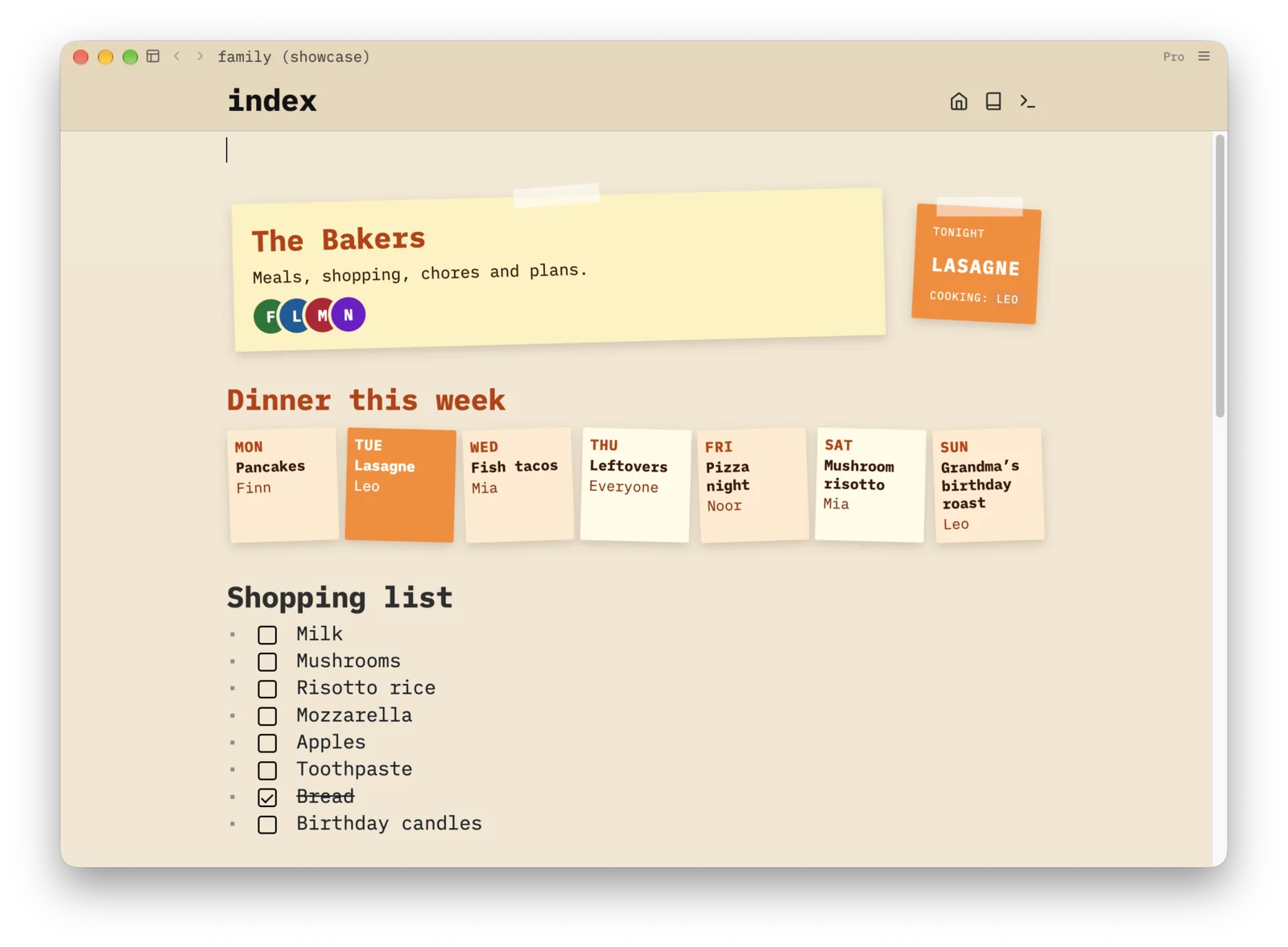 Note the theming now even applies to the title bar. Cool right? More detail on this family use case.
So with 2.12 the desktop app is switching from Tauri to Electron. Nothing bad on Tauri here — it’s been an enabler, but Electron works better for me right now. Unfortunately, I cannot make this transition 100% smooth. When you upgrade your desktop app to the last Tauri build you may get instructions to download the new build yourself. After you launch that new build, an import will happen, but this will disable sync for all your spaces, which you’ll have to manually re-enable. The reason is that I could not migrate the auth credentials. This is a one-time thing and future desktop app upgrades won’t have this problem. Sorry about the inconvenience. And if somehow the upgrade fails, simply visit the download page and redownload.
Mobile improvements
As I mentioned, with the decision to not mentally plan a “native” mobile app (with a bonus of avoiding all the Apple and Play Store app approval shenanigans), I decided to invest a bit more in the experience of the mobile experience.
Most visibly, we now have now have a “keyboard bar” — a bar positioned just above your virtual keyboard with common operations that adapt to the context. In the screenshot below you see the buttons in an outline: outdent, indent, turn into task, move up, down etc. I’ve tried getting this to work reliably, but had failed especially on iOS thus far, but with iOS 26 and 27 this now seems to work quite reliably. It’s been a huge improvement in my joy of using SilverBullet on mobile.
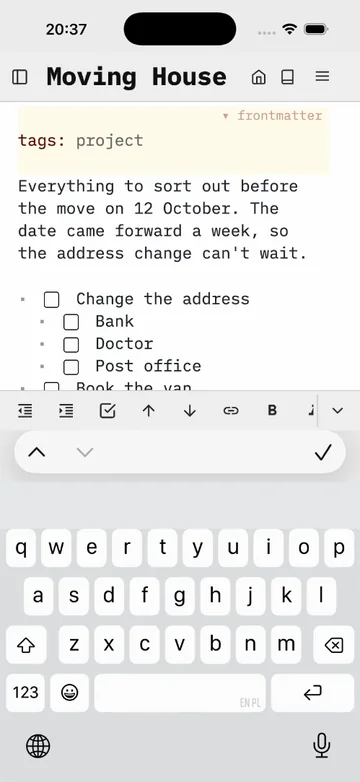
Also visible on this screenshot (top left) is the “there’s something docked here” button, which is the mobile way of supporting left and right docked views (such as file trees).
For Android, there’s now web share support: you can share to SilverBullet if you have it installed as a PWA.
In addition I fixed a bunch of bugs, modal positioning issues etc. Oh yeah, and File: Upload now should work more reliably.
Performance
Somebody on the community forum mentioned their experience using SilverBullet with spaces of 5-25k pages. Yeah, that hadn’t been tested very widely yet. However as it turned out, there were a fair number of low hanging fruit fixes and improvements that could be made to make this more workable. And they ship with 2.12 as well. Also in smaller spaces this hopefully makes things more snappy.
Upgrade notes
If you’ve properly upgrade to 2.11 before, upgrading your Server should be nothing but the usual docker update or silverbullet upgrade call. For Desktop as mentioned you’ll likely be asked to redownload a new build and need to re-enable sync on your spaces.
Support SilverBullet development
Last year I made the decision to reduce my regular day job to fewer days to create more time to work on SilverBullet. This allows for deeper focus and more ambitious work. And as you can tell it’s paying off! I mean, look at that website. So much wow.
If you like this direction, and would like to support it, there are multiple ways to make this more financially palatable for me:
A big ❤️ to all already supporting this way — it’s much appreciated! And as you can tell from the progress, we’re moving full steam ahead with the additional time that I can now spend!
Full(ish) changelog
- Mobile improvements:
- New: keyboard bar (bar positioned above the keyboard) with common editing operations, fully programmable via API/keyboardBar.
- On mobile (narrow screens) left and right navigator drawers now have top-bar buttons that remain available after selecting a page. Closing a view (with the “x” button) removes its button.
- Android PWA web apps now advertise a Web Share Target for links, text, and files, initially targeting Android Chrome.
- Fix: pickers, prompts, and confirmations on narrow screens open below the top bar, keeping their controls accessible.
- Fix (iOS):
File: Uploadopens the file picker on iPhone, iPad, and desktop, and dropping files into the Space tree uploads them on desktop Safari. - Fix (iOS): pressing Return in a list reliably continues it, instead of sometimes inserting extra blank lines or editing the wrong line, especially right after opening a page.
- Performance improvements:
- Large spaces (tens of thousands of pages) are much faster: the first sync no longer slows down as it progresses, opening a page no longer re-reads the whole index after unrelated edits, and the space tree only renders the rows near what’s on screen, so a flat folder with thousands of pages opens and follows the editor without lag. The server also keeps the space’s file list in memory, kept current by its file watcher, instead of re-scanning the whole folder for every client every few seconds, which mattered most on network drives, Docker volumes, and Windows.
- More iteration on API/view and API/widget APIs, still WIP.
- Breaking:
view.newis gone, build live list, tree, table and content widgets withwidget.new { source = … }orwidget.new { content = … }, and pass them toview.defineaswidget = …(previouslyview = …). See View: Widgets and views. - Content views can show HTML and DOM widgets, not just Markdown, in every dock.
- Views docked above or below the page can use
frame = "minimal"to render as plain page content with hover-only buttons, replacing top and bottom widgets defined throughhooks:renderTopWidgets/hooks:renderBottomWidgets(now deprecated).refreshOnalso accepts the trigger names"index","navigate"and"edit". - Inline list, tree, and table views can opt into a panel-style filter input with
filter = { inline = true }and set atitlefor the embedded header.
- Breaking:
- Page tags can define a custom Live Preview for Frontmatter, showing a page-specific header in place of the source while keeping the YAML one click away for editing. Go to definition jumps to the renderer’s Space Lua. See API/tag: Frontmatter live previews
- Top and bottom page widgets and page-docked views now have a Go to definition button (
</>) that jumps to the Space Lua defining them. - Pages and documents can be dragged from the Space tree into the editor to create links, or into a file manager to download them where supported.
- The Runtime API and CLI can capture screenshots again:
sb screenshotsaves a PNG of the runtime client, optionally clipped to one element with--selector. - Git sync connections can target a chosen remote branch, including when it differs from the space’s local branch. The connection overview shows both branches, and a checked unrelated-history merge tolerates new commits on either side before its first sync.
- Fix: rendered Markdown preserves application links such as
message:and custom protocols, including URLs without//. - Fix: text you type right after another user’s newly added line (for example a comment at the end of a task they just wrote) is no longer highlighted as their change in your own editor.
Subscribe to No SilverBullet
Get new posts by email. No spam, unsubscribe anytime.
Prefer a feed? Grab the RSS feed.